The Abstraction Ladder: How Lifeless Electricity Becomes Text, Color, and Apps
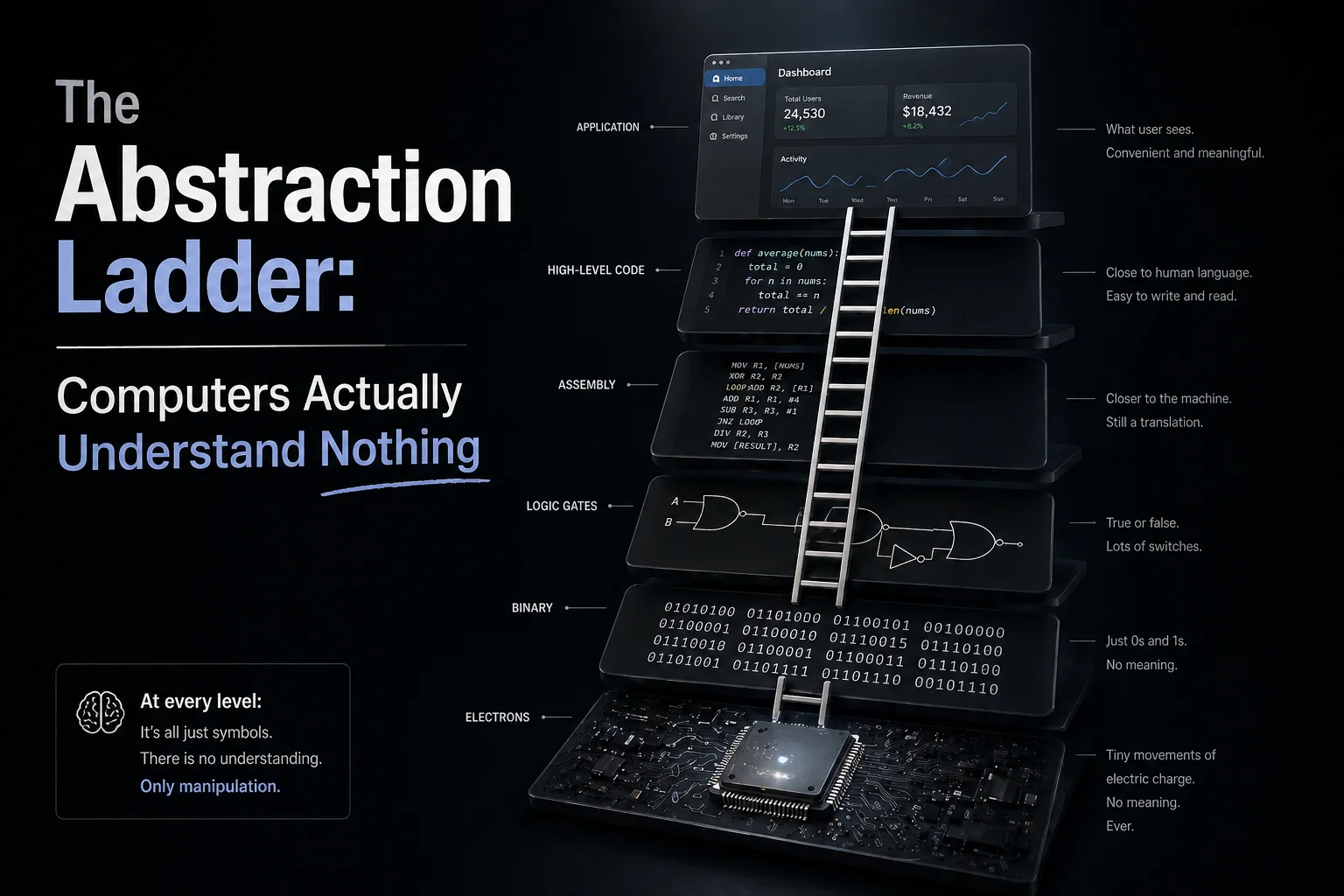
A copper wire inside your computer only conducts electricity—it has no idea what the letter 'A' looks like. Climb the 6 remarkable steps that turn simple on/off switches into living software.
Look closely at the screen where you are reading these words.
You see crisp letters, smooth buttons, and vibrant colors. Yet if you took a screwdriver and opened up your laptop or phone, you wouldn’t find a single letter of the alphabet or a tiny paintbrush inside. The only thing racing across the circuit board is electricity—the exact same lifeless energy flowing through your toaster or desk lamp.
That raises a deceptively simple question that once puzzled the greatest minds of the 20th century: How can a copper wire that only carries electrical current “understand” the letter A, calculate your paycheck, and render a 3D world?
The answer is a 6-step staircase called The Ladder of Abstraction. Each step takes something raw and primitive from the step below, wraps it up, and hands a clean, simple tool to the step above. Let’s climb from the physical bottom all the way up to your screen!
Step 1: Electricity & Why Computers Only Count 0 and 1
People often wonder: “Humans comfortably count from 0 to 9 (decimal) every single day. Why did engineers force computers to use only 0 and 1 (binary)?”
It turns out engineers didn’t do this to make life difficult—they did it because real-world electricity is messy and noisy.
Imagine trying to send numbers down a wire with a maximum voltage of 5 Volts:
- If you divided that wire into 10 voltage levels to represent digits
0through9(say,0.5Vfor 1,1.0Vfor 2…4.5Vfor 9): the moment a refrigerator motor kicks on nearby or static interference causes the voltage to dip by a tiny0.4V, your8instantly turns into a7! Your bank balance could lose millions just because the power flickered. - To prevent mistakes, engineers made a ruthlessly practical choice: Don’t use 10 levels—use only two extreme states!
- Strong voltage (above 2 Volts) → Counts as
1(ON). - Almost no voltage (below 0.8 Volts) → Counts as
0(OFF).
- Strong voltage (above 2 Volts) → Counts as
By keeping those two states far apart, even when electrical current wobbles with noise, the hardware can tell ON (1) from OFF (0) with near-100% certainty.
Step 2: Grouping 8 Light Switches into Letters and Colors
A single On/Off switch (called 1 Bit) can only answer “Yes” or “No”. How do we get the entire alphabet out of that?
We use the exact same trick as signaling with flashlights: Line up 8 switches side by side (called 1 Byte).
With 8 switches, each capable of being ON or OFF, you get 2 × 2 × 2 × 2 × 2 × 2 × 2 × 2 = 256 unique combinations (numbers 0 through 255). Computer makers worldwide simply agreed on a shared lookup rulebook (the ASCII table):
- Whenever the 8 switches are flipped in the pattern
01000001(number65) → Draw the capital letterAon screen. - Whenever they read
01000010(number66) → Draw the letterB. - And if you send that exact same
01000001pattern to your monitor’s display circuit instead of a text editor? It means: “Light up the red LED pixel at brightness level 65 out of 255!”
Try Step 1 & Step 2 hands-on below: Drag the Electrical Noise slider to see why a 2-state system survives heavy interference, and click any of the 8 switches to build your own letters and pixel colors!
Voltage & Binary Encoder
Step 1 (Why only 0 and 1?): Real-world electricity constantly flickers with noise. If we used 10 voltage levels (for 0–9), a tiny dip would turn an 8 into a 7! By using only two states—'Power ON (>2V) = 1' and 'Power OFF (<1V) = 0'—even noisy electricity is read with 100% accuracy!
Step 3: Logic Gates — Wiring Switches So They Can “Do Math”
Up to Step 2, our computer can only store letters and numbers as static switches. How do lifeless switches actually add two numbers together or make decisions?
The secret lies in how engineers wire microscopic transistor switches together into tiny building blocks called Logic Gates:
- Series Wiring (
ANDGate): Like a bank vault that requires both the Manager’s key and the Accountant’s key turned at the same time. Electricity only reaches the light bulb (1) if Switch A is ON (1) AND Switch B is ON (1). - Parallel Wiring (
ORGate): Like a house doorbell connected to both a front-door button and a back-door button. Press Button A OR Button B, and the chime rings (1). - Staircase Wiring (
XORGate): Just like a two-way hallway switch at the top and bottom of your stairs—the light turns ON (1) only when the two switches are in different positions (0and1).
Here is where the magic happens: wire one XOR gate and one AND gate side by side, and you have just built a circuit that adds two binary numbers together! Multiplication is just repeated addition; division is repeated subtraction. A modern CPU doesn’t have a “brain” inside—it simply packs billions of these tiny switch gates flipping billions of times every second!
Interactive Logic Gate Lab: Flip Switch A and Switch B below across different gate types (
AND,OR,XOR,NOT) to watch how electricity flows through the circuit!
Logic Gate Simulator
AND Gate (Like a two-key bank vault): The light turns ON (1) only when BOTH Switch A and Switch B are turned ON at the same time.
Step 4: Machine Instructions (Assembly) — The Chip’s Command List
Once billions of logic gates are wired into a processor chip, the manufacturer builds in a menu of basic physical actions the chip knows how to perform: fetch a number from memory, add two numbers, or store the result back.
In the earliest days of computing, programmers had to command the chip by punching in raw strings of 0s and 1s (like 10110000 01100001). Mistype a single 0 as a 1 and the whole program crashed!
To save their sanity, engineers built Step 4 (Assembly Language): instead of typing 10110000, they gave each binary command a short English nickname:
MOV(Move): Copy a number from one slot to another.ADD: Add two numbers together.JMP(Jump): Skip to a different instruction line.
Even with nicknames, working at Step 4 meant micromanaging the hardware by hand: “Grab the number in memory slot 1004, put it into CPU drawer #1, add 5, then copy it back to memory slot 1008.”
Step 5: Programming Languages — Writing in Human Thought
If programmers still had to micromanage every CPU drawer by hand, it would take decades just to build a simple mobile app.
So engineers built Step 5: High-Level Programming Languages (like Python, JavaScript, C++, and Rust).
At this step, developers completely forget about voltages, logic gates, and CPU drawers. When they want to calculate an average score, they simply write a line that reads almost like everyday English:
let averageScore = totalPoints / subjectCount;Behind the scenes, a translator program (called a Compiler) automatically breaks that single human-friendly line down into hundreds of Step 4 MOV and ADD commands, which then cascade into thousands of Step 1 electrical pulses!
Step 6: The Application UI — The Penthouse Suite
Finally, we arrive at Step 6—where you and billions of people live every day: web browsers, food-delivery apps, music players, and AI chat windows.
At the top of the ladder, you don’t even need to know Step 5 code exists. You simply tap the “Place Order” button with your finger.
In the millisecond your finger touches the glass:
- Step 6 (The UI) tells Step 5 (Application Code): “The user just tapped Buy!”
- Step 5 translates that into Step 4 (Machine Instructions).
- Step 4 triggers billions of Logic Gates (Step 3).
- Those gates flip millions of 8-Bit Byte patterns (Step 2).
- And at the bottom (Step 1), billions of
3.3Velectrical pulses race across silicon transistors to light up the pixels on your screen: “Order Confirmed!”
Takeaway: The Power of Hiding Details
The entire history of computing comes down to one design principle: Each step on the ladder exists to hide the overwhelming complexity of the step directly beneath it.
Because of this 6-step ladder:
- A web designer doesn’t need a voltmeter to style a button.
- You don’t need to memorize binary code
01000001just to text a friend.
Continue the Series:
- Zoom into Steps 4 & 5: What actually happens inside the CPU chip, RAM stick, and Operating System when a program runs? Read next: The Truth About How Code Runs: From Bare Metal, OS to Virtual Machines
- The Big Picture: Humans didn’t invent this 6-layer architecture—your own living body uses the exact same 6-layer design! Explore: Nature Is an Abstraction System: How Programmers Just Copied the Universe